 monica
CREATIVE NOTES / Coding & playful learning
Turn the phone sideways: how Crystal Blocks arranges its controls
Open Crystal Blocks, an AI-assisted collaborative game in Zhan Yining’s portfolio, and turn a phone from portrait to landscape. Monica’s game presents a concrete change: movement and action buttons shift from below the board to opposite sides. This close look at the published interface follows how the same falling-block game makes room for a different screen shape and two hands.
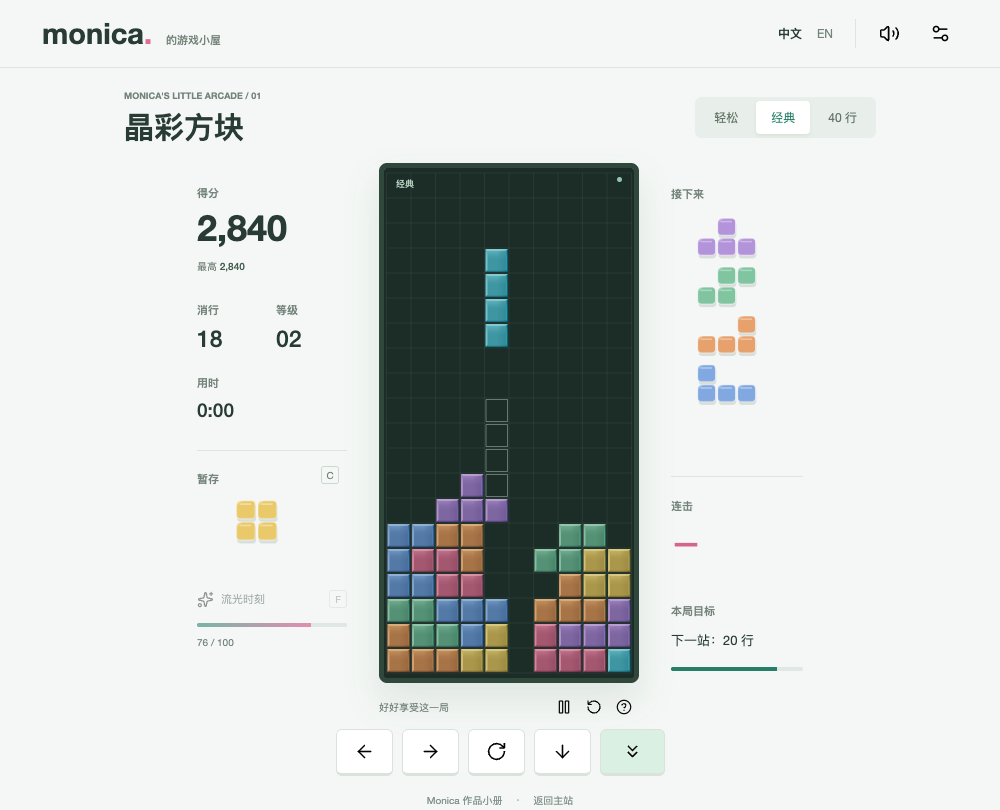
Five buttons form two groups in portrait
Below the portrait board, a dark directional group contains left, right and soft-drop buttons. On the other side, a pink circle rotates clockwise and a pale-green circle performs a hard drop. The two circles are staggered vertically. Icons, shapes, colours and positions reinforce the distinction. Before a first round, identify soft drop and hard drop separately: one moves the piece down a step, while the other sends it to its landing position. They support different decisions while placing a piece.
Landscape uses the width around the board
In landscape, the directional group moves left and the circular actions move right, with the board in the centre. The title and mode choices sit toward the left, the art entry is near the upper right, and pause remains beneath the board. Recognisable shapes are retained while the distances change. Before starting, find movement, rotation and pause in each orientation. Compare the parts of the screen a finger would need to cross, rather than judging the layout only from its overall appearance.
Decide which information must remain visible
Score, cleared lines and level are gathered above the board, with the held-piece preview nearby. Upcoming pieces remain to the right. The phone layout hides some desktop details, including keyboard shortcut badges; landscape also hides the goal-description area. This creates an order of attention: the active piece and upcoming pieces come first, with vocabulary or art panels available separately. It is a concrete example for discussing which information needs constant visibility and which can be reached when wanted.
A button should show when it is being pressed
During play, holding a movement button repeats the action, and releasing it ends that input. A pressed button also shifts slightly downward, giving a visible cue that it is active. Try a short left press, then a held left press, and notice the difference. These are responses supplied by the interface. To judge how the arrangement suits your hands, try it on your own device and look especially for whether a finger covers the landing area you need to inspect.
Try a comparison with one clear focus
Choose one mode, identify the controls in portrait, then pause and turn the phone to inspect landscape. On paper, note where a button is, what its action does and what you had to search for twice. Chinese and English choices remain at the top; switching lets you compare the labels with their icons. A note such as “I looked in two places for pause” gives a more specific discussion point than a general verdict. This reader exercise produces questions for a future interface revision.
Two more questions
Why are soft drop and hard drop separate buttons?
They perform different actions. Soft drop moves down a step and repeats when held; hard drop sends the piece directly to its landing position. Separate buttons make the choice visible.
Does landscape add new game rules?
The layout rearranges the board, information and controls. Turning the screen does not itself add a row-clearing rule. Compare the same mode in both orientations.
Explore the works in this note
Profile information was supplied by her family. These notes were prepared by the Monica portfolio editorial team from the original works, performance records and playable projects on this site, with AI-assisted writing and translation. Descriptions of existing work are distinguished from activities readers may try. The articles are editorial introductions, not first-person accounts written by Monica.
Profile and editorial notes →